


요즘 유행하고 있다는 나나바나나 프로 이용한 프로필 사진 제작용 프롬프트입니다. 저도 인터넷 서칭 중 발견해 공유합니다.
Table of contents
목차 보이기
프로필 사진 제작용 프롬프트
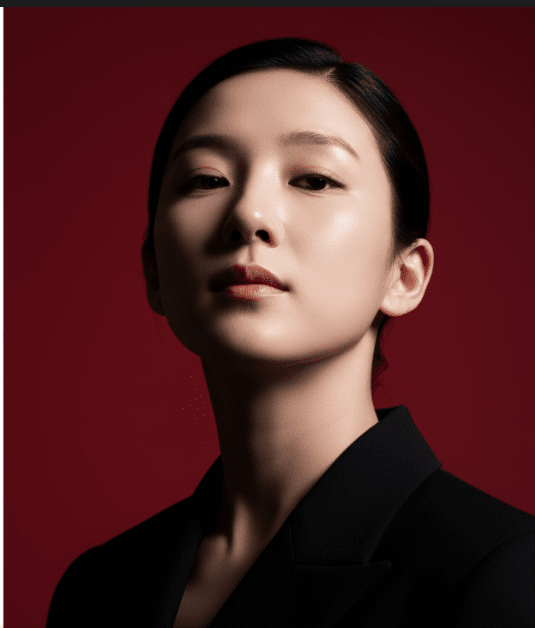
“Please create a vertical portrait shot in 1080×1920 format using the exact same face features, characterized by stark cinematic lighting and intense contrast. Captured in a slightly low, upward-facing angle that dramatized the subject’s jawline and neck, the composition evokes quite dominance and sculptural elegance. The background is a deep, saturated crimson red, creating a bold visual clash with the model’s luminous skin and dark wardrobe
원본 이미지
나노 바나나 프로로 만든 이미지입니다.
프로필 이미지 결과
영문 프로필 사진 프롬프트 예제
아래는 나노 바나나 프로(Nano Banana Pro)로 프로필 사진, 인물 사진 등의 프롬프트 예제입니다. 참고용으로 영어 원문 위주로 제공하며, 구조에 따라 원하는 내용만 바꿔서 사용할 수 있습니다.
- “Create a professional profile photo of a young woman, neutral expression, bright natural lighting, plain white background, upper body portrait, business casual attire. Photorealistic style.”
- “Generate a close-up portrait of a confident man in his 30s, wearing a smart suit, standing in front of a blurred cityscape background. Vibrant colors, sharp focus, magazine cover quality.”
- “Draw a smiling woman with long straight hair, wearing a simple blouse, soft natural light, studio background in light gray. The style should be warm and approachable.”
- “Produce a photorealistic headshot of a middle-aged man, clean shaven, neat hairstyle, navy blue shirt, minimalistic light blue background. The subject is making direct eye contact.”
- “Create a LinkedIn profile picture showing a young professional, gentle smile, glasses, smart-casual outfit, subtle gradient background. Emphasize clarity and facial detail.”
- “Make a square portrait photo suitable for official documents, clear white background, neutral face, evenly balanced studio lighting, sharp details, no artistic effects.”
프롬프트 작성 팁 및 구조
- [Core subject] + [Expression/clothing] + [Lighting/background] + [Style/detail] 형식으로 구성하면 자연스럽고 원하는 결과에 가까워집니다.
- 원하는 성별, 나이, 헤어스타일, 시선(카메라 쳐다보기 등), 조명(밝고 균일하게 등), 배경(밝은/흰색/블러 처리) 등 디테일을 함께 입력하는 것이 효과적입니다[1][2][3][4].
이 프롬프트를 복사/붙여넣기로 활용하거나 원하는 포맷으로 수정하면 됩니다. 추가 영문 예시가 더 필요하다면 말씀해 주세요.